Building an Occupied Ports Widget for Glance
A small widget that shows which host ports my Docker containers are already using, so I stop picking ports that are taken.
Every time I wanted to add a new service to my homelab, I’d hit the same question: which ports are already taken?
If you’ve used Docker, you know the problem. Each container that needs to be reachable gets a port on the host, like 8080 or 3000. Pick one that’s already in use and the container fails to start, or worse, you spend ten minutes wondering why the wrong app opens in your browser.
Checking isn’t hard. docker ps will tell you. But I was doing it so often that I wanted the answer just sitting there on my dashboard. So I built a small widget for Glance that does exactly that.
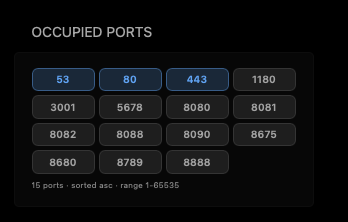
What it shows
Each chip is a port that’s currently in use on the host. At a glance I can see:
- which ports are taken, sorted however I like
- how each one is exposed: only on this machine (
127.0.0.1), on my Tailscale network, on my home network, or open on every interface - which container is using it, if I turn that on
- common reserved ports like 22, 53, 80 and 443, marked so I don’t accidentally use them
Hovering over a chip shows the details, and clicking one opens that service.
The “how it’s exposed” part turned out to be more useful than I expected. It’s an easy way to spot a service I meant to keep private but accidentally published to everything.
How it works
It’s a tiny Python service that runs next to Glance:
- It asks Docker which containers are running and what ports they publish.
- It cleans that up into a simple list: one entry per port, with protocol and exposure info.
- Glance fetches that list and shows it as chips.
It never talks to Docker directly. It goes through a socket proxy that only allows reading the list of containers, nothing else. Giving a web app full access to the Docker socket is basically giving it full control of your server, so I didn’t want that.
Setting it up
The short version:
1
2
3
git clone https://github.com/js-surya/occupied-ports-widget.git
cd occupied-ports-widget
docker compose up -d --build
Then you add a widget block to your glance.yml that points at it.
The README has the full steps, the Glance config, all the options (like port ranges and sorting) and some notes on running it safely. I’m keeping it there so there’s only one place to update.
Small thing, used every day
It isn’t a big project. But it removed a small annoyance I ran into almost every time I deployed something, and those are my favourite kind of fixes.
If you use Glance and Docker, give it a try, and feel free to open an issue if something doesn’t work for you.